TL;DR
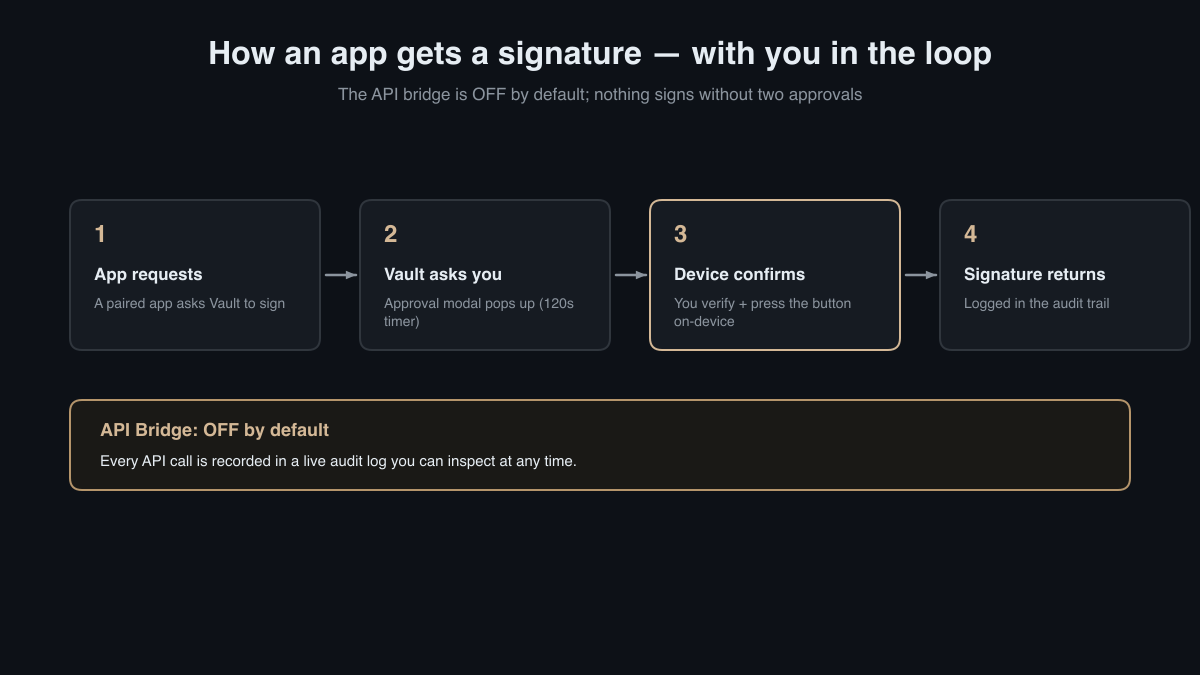
Vault Desktop prioritizes security by keeping its REST API bridge off by default, ensuring no external applications can interact with your KeepKey unless you explicitly allow it. Every integration must pass through a pairing process, and all signing requests demand your on-screen approval, followed by confirmation on the KeepKey device. Real-time audit logs provide full visibility into API interactions, giving you the control you need to safeguard your digital assets.
The Bridge is Off Until You Turn It On
Opt-in by design: Vault Desktop's security model begins with the API bridge off by default. This REST API, running on
, is a powerful tool for enabling integrations with external applications. However, its default state is inactive, which means any potential vulnerabilities are kept at bay unless you choose to activate it. This default setting reflects a security-first approach, where potential entry points for unauthorized access are minimized. Consider the analogy of a house with a locked front door, where you control who gets a key.
User control: You can enable the bridge via Settings → Application → API Bridge. This ensures that your decision to connect with external services is deliberate, directly reducing your exposure to unauthorized access. By requiring users to manually activate this feature, Vault Desktop empowers them with the responsibility and autonomy to manage their digital ecosystem. For instance, if you decide to use a new portfolio management tool that requires API access, activating the bridge becomes a conscious choice, not a default risk.
Apps Must Pair (and You Can Revoke Them)
Pairing process: Before any external application can interact with your Vault, it must first pair with your device. This involves approving a pairing request, after which the app receives a unique, revocable API key. This key allows it to communicate with the Vault, but only within the permissions you've granted. Imagine an API key as a guest pass to your digital safe, where you decide both the duration and level of access permitted.
Manage your connections: Vault allows up to 20 paired applications, giving you the flexibility to choose who has access. If an app's access is no longer required, or if you suspect any malicious activity, you can revoke its pairing via the paired-apps panel, ensuring that you retain full control over your device's connections. This control is akin to being able to change the locks on your house whenever you feel insecure about who might have a key. It provides peace of mind, knowing that you can instantly sever a connection if your trust in an application changes.
Human-in-the-Loop Signing
Two-step approval: Every signing request from a paired application activates a 120-second countdown modal on Vault Desktop. You must manually approve or reject the request, ensuring that nothing happens without your explicit consent. This "human-in-the-loop" approach adds an essential layer of scrutiny, preventing unintended transactions. For instance, if an app attempts a transaction while you're away from your device, it cannot proceed without your intervention, effectively putting you in control at the critical moment.
Physical confirmation: Once you approve a request on the screen, the final step requires you to physically press a button on the KeepKey device itself. This step guarantees that no transaction can proceed without your direct involvement, reinforcing the principle of self-custody. This method is analogous to a dual-key vault system, where multiple confirmations are required to proceed, ensuring that one person cannot unilaterally authorize a transaction.
A Live Audit Log of Everything
Real-time transparency: Each API call is logged in a live audit log, stored locally on your system. The log retains the last 5,000 entries, documenting the method, route, time, status, app, and the request/response for every interaction. This visibility allows you to monitor and audit all activities, providing peace of mind that you can spot any anomalies quickly. Imagine having a detailed ledger of every interaction with your digital assets, allowing you to retrace steps and identify suspicious behavior before it becomes a threat.
Empowerment through information: By examining the audit log, you can identify red flags like unexpected requests or unfamiliar app identities. This proactive approach transforms potential risks into manageable insights, enabling you to take appropriate action when necessary. For example, if you notice unusual activity from an app you no longer use, you can quickly revoke its access, thereby preemptively mitigating any potential security breaches.
Takeaway
Vault Desktop's security model is built on the principles of user sovereignty and transparency. By keeping the API bridge off by default, enforcing stringent pairing and approval processes, and maintaining comprehensive audit logs, Vault empowers you to manage your digital assets with confidence. For those who value self-custody and privacy, Vault Desktop offers a robust framework to safeguard your cryptocurrency holdings.
To learn more about Vault Desktop's features and how it differs from KeepKey Desktop, explore our What is KeepKey Vault and Why It Exists and Vault Desktop vs. KeepKey Desktop: What Changed and Why It's Safer articles.